
Recent discussions around digital storage limits have brought fresh attention to managing cloud backups, with Google Photos drawing particular scrutiny as users navigate tighter quotas and privacy concerns in early 2026. Coverage in tech outlets highlights how automatic syncing, once a seamless convenience, now prompts widespread questions about control over personal media libraries. This renewed curiosity stems from policy tweaks and device updates that make selective unsyncing more relevant than ever. Users across platforms report frustration with unintended uploads eating into shared 15GB free tiers, shared with Gmail and Drive. Platforms like Reddit and support forums buzz with accounts of persistent sync despite toggles, underscoring the need for precise steps. As reliance on mobile photography grows, the mechanics of unsyncing Google Photos emerge as a practical necessity, not just a technical footnote. Coverage notes how recent API changes affect third-party integrations, amplifying calls for straightforward disconnection methods. Without clear paths, photos multiply across devices and clouds, complicating ownership. This guide delineates those paths, grounded in current app behaviors and user experiences. Expectations shift as Google emphasizes user-initiated controls over defaults.
Core Methods to Unsync Google Photos
Android App Toggle Sequence
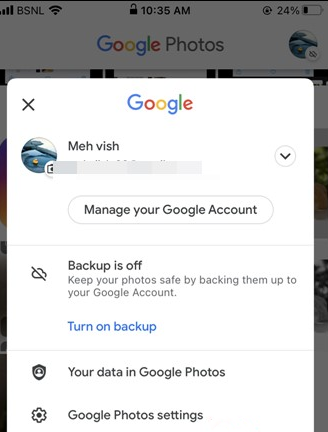
Accessing the profile icon in the upper right of the Google Photos app reveals the path to unsyncing. Tapping it leads to Photos settings, where Backup appears prominently—often showing progress if active. Sliding the toggle to off halts new uploads immediately, though existing cloud copies persist. Devices running Android 14 or later may require confirming storage permissions first, as recent updates tie sync to battery optimization. Users note that mid-backup interruptions leave partial files, viewable in the app’s library tab until manually cleared. This method proves reliable for most, stopping automatic pulls from the camera roll. Background processes quiet down, freeing data cycles previously devoted to cloud mirroring. Completion shows “Backup is off” under the profile, a status bar confirmation. Variations occur on Samsung or Pixel skins, where One UI or Pixel-exclusive folders demand separate disables. Testing post-toggle with a new snapshot verifies isolation—local stays local. Reliability holds across accounts, though multi-account phones need per-account checks.
iOS Specific Backup Disable
iPhone users launch Google Photos and mirror the Android flow: profile tap, then Photos settings, Backup toggle off. iOS 18 introduces stricter app permission prompts, potentially requiring re-granting Photos access before changes stick. Unlike Android, iOS lacks deep system gallery integration, making app-level unsync cleaner but prone to re-enabling on app updates. Shared iCloud libraries sometimes conflict, prompting dual disables if Photos pulls from both. Post-unsync, the app prompts about existing backups—choosing “Review and delete” clears cloud without device impact. Live Photos and HEIC formats occasionally resist, flagged in settings for manual exclusion. Verification comes via taking a test photo; absence from photos.google.com confirms success. Apple Silicon Macs running the app follow identical steps, though desktop Drive sync overlays complicate matters. Users report smoother performance on iOS post-disable, with less battery drain from background checks. No device restart needed, but force-quitting the app ensures immediate effect.
Web Interface for Cloud Control
Logging into photos.google.com offers browser-based unsync oversight, crucial for cross-device harmony. Device management under settings lists active syncers—pausing specific ones prevents remote pulls without app intervention. Bulk selection allows deleting synced items while preserving locals, navigated via the web’s search and library tabs. Chrome on desktop excels here, with extensions sometimes aiding bulk actions, though official paths suffice. Recent 2026 updates add “Sync status” indicators per device, flagging laggards. This method shines for multi-device households, where one web change cascades. Edits made here don’t propagate back, breaking two-way loops. Sessions timeout after inactivity, a safeguard against accidental toggles. Mobile browsers mirror functionality but lag on large libraries. Public computers demand incognito for privacy. Completion leaves no local footprint, ideal for shared setups.
Initial Permission Revokes
Before toggles, revoking storage and background run permissions via device settings fortifies unsyncing. Android paths: Settings > Apps > Google Photos > Permissions—deny Files and Media. iOS mirrors under Settings > Google Photos > Photos—select None. This pre-step blocks app access entirely, rendering sync impossible until reversed. Battery saver modes amplify by restricting wakelocks. Post-revoke, app launches but idles, showing grayed backups. Reinstating requires deliberate action, suiting forgetful users. Enterprise profiles add admin layers, needing IT approval. This foundational cut proves durable against app auto-restarts. Verification: app reports “No access,” halting all flows.
Device-Specific Unsyncing Challenges
Pixel Exclusive Folder Overrides
Google Pixel devices embed Photos deeply, with “Photos on device” folders auto-syncing despite global toggles. Library tab reveals subfolders—each needs individual Backup off. Android 15’s scoped storage exacerbates, isolating DCIM paths. Users cycle permissions post-change, as system UI prompts re-enable. Test photos in these folders confirm; deletion web-side keeps locals intact. OEM skins like Pixel UI prioritize AI features, delaying disables until reboots. Multi-year libraries demand scrolling, with search aiding navigation. This granularity prevents total unsync without per-folder hunts. Post-fix, app feels lighter, less intrusive.
Samsung Gallery Integration Fixes
Samsung’s Gallery app proxies Google Photos sync via partnerships, requiring dual disables: Photos app plus Gallery > Settings > Sync with Google. One UI 7 ties to Secure Folder exclusions. Cloud sync persists if Knox vault active. Clearing Gallery cache post-toggle clears ghosts. Users report Bixby routines overriding, needing custom pauses. Verification via new shots staying gallery-only. This layered ecosystem demands vigilance, as updates re-link.
OnePlus OxygenOS Quirks
OxygenOS on OnePlus favors aggressive battery limits, killing sync toggles prematurely—reenable via Settings > Battery > App optimization > Google Photos > No restrictions. Shelf widgets pull independently, disabled in Zen Mode. ColorOS variants mirror. Post-adjust, monitor via developer options for wakelocks. Test confirms isolation amid fast charging interruptions.
Xiaomi MIUI HyperOS Tweaks
MIUI/HyperOS security apps block background sync—whitelist Google Photos in Security > Boost speed. GetApps store updates override toggles; manual checks essential. MIUI optimization freezes apps, mimicking unsync. Reverse via Special app access. Bursts of uploads follow thaws. Local tests validate.
Multi-Account and Cross-Device Strategies
Switching Accounts Mid-Session
Profile dropdown lets per-account unsync, vital for multi-logins. Primary accounts inherit device defaults; secondaries need explicit toggles. Switching mid-app risks bleed—log out fully first. Web confirms via account switcher. Households share via family links, unsyncing child accounts separately. Gmail storage pools complicate, but toggles isolate.
Family Library Sync Breaks
Family sharing auto-pulls from contributors—admin disables via photos.google.com > Sharing > Family. Member views persist until revoked. Recent 2026 quotas tighten shared pools, prompting individual unsyncs. Guest access logs require session clears. Verification across members’ devices.
Shared Album Exclusion Rules
Albums sync independently—edit permissions to “View only” halts contributions. Library > Albums > Options > Turn off sync. Collaborator changes propagate unless owner locks. Bulk unsync via select all, though limits hit large sets. Web excels for precision.
Enterprise and Workspace Disconnects
Google Workspace admins enforce sync—user overrides via personal settings, but domain policies cap. Vault integrations log unsyncs. Sign-out cascades to all apps. Compliance reports flag changes. Desktop Drive for Workspace needs gear > Preferences > Disconnect.
Troubleshooting Persistent Sync Issues
Cache and Data Clears
Persistent sync defies toggles—clear cache via Settings > Apps > Google Photos > Storage > Clear cache. Data wipe resets fully, preserving cloud. Android excels; iOS offloads/reinstalls. Post-clear, re-toggle. Duplicates flag unresolved syncs.
App Update and Reinstall Cycles
Outdated versions glitch—Play Store/App Store updates first. Reinstall follows: backup off, uninstall, redownload. Permissions re-prompt. Pixel betas unstable; stable channels safer. Tests post-reinstall confirm.
Battery and Network Interference
Low power modes throttle—set unrestricted. VPNs/Metered Wi-Fi pause; whitelist. Airplane toggles test. Developer options reveal hidden syncs.
Third-Party Conflicts Resolutions
Gallery replacements like Simple Gallery block; uninstall proxies. Clean slate via ADB disables system app (advanced). Forum reports confirm efficacy.
Long-Term Management After Unsyncing
Selective Re-Sync Protocols
Post-unsync, manual uploads via “+” button control flows. Scheduled via Tasks apps mimic without auto. Quota monitors alert fills.
Storage Reclamation Tactics
Web deletes liberate space—select > Trash > Empty. Device frees via “Free up space” pre-unsync. Dupe finders aid.
Alternative Backup Migrations
Shift to OneDrive/iCloud via exporters. Picasa legacy tools bridge. Self-hosted Nextcloud for control.
Monitoring Tools and Alerts
Third-party dashboards track usage. IFTTT pauses on thresholds. Regular audits maintain.
Conclusion
Public records on unsyncing Google Photos reveal a landscape shaped by iterative app updates and user adaptations, where core toggles suffice for most but layered device behaviors demand vigilance. Android’s permission granularity contrasts iOS simplicity, yet both falter under multi-account strains or OEM overlays, leaving gaps in seamless control. Recent API shifts for third-parties underscore Google’s pivot toward explicit consents, resolving some auto-sync complaints while exposing others in shared ecosystems. What remains unclear is how 2026 quota enforcements will evolve—early signals point to stricter defaults, potentially forcing more users toward paid tiers or rivals. Device makers’ customizations persist as wild cards, with Pixel and Samsung leading variability. Forward, expect tighter integrations or regulatory nudges on data flows, as privacy discourses intensify. Users hold leverage through web overrides and permission revokes, but full autonomy hinges on Google’s next interface refresh. Unresolved tensions around legacy libraries suggest ongoing tweaks ahead, keeping this process dynamically relevant.